
Overview
These Teacher Dashboard Updates make it easier to manage student settings, review recent activity and generate exportable student reports. As a result, everyday monitoring and follow-up are now faster and more practical for teachers and staff.
What’s Included in Teacher Dashboard Updates
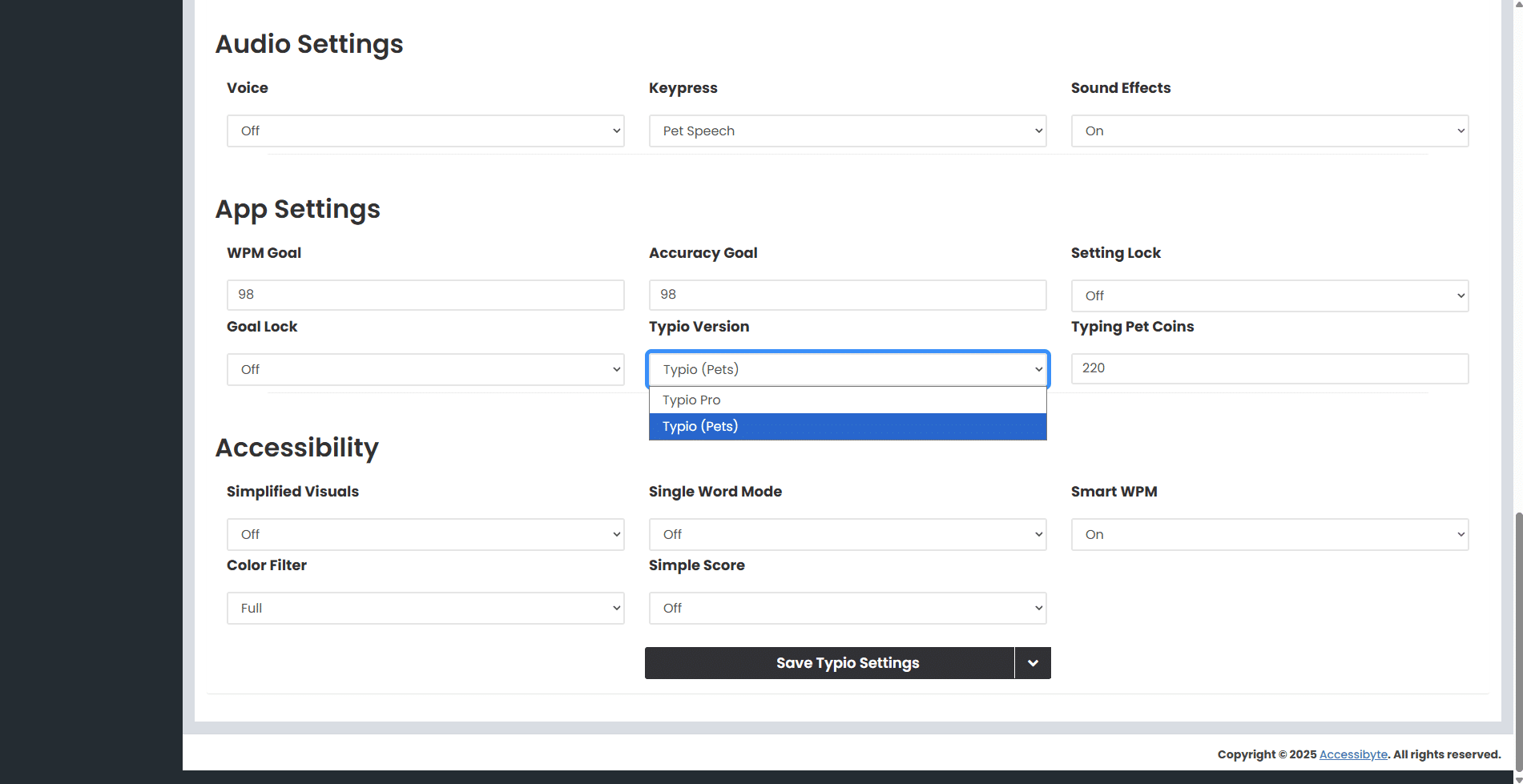
Typio or Typio Pro
Teachers can now choose between Typio and Typio Pro for each student. This makes it easier to match the experience to the learner’s needs and goals.
Switching Between Typio Pets and Typio Pro
- Log in to your teacher dashboard.
- From the My Students page, click Overview for the desired student.
- Click the Typio tab, then scroll down to Settings > App Settings.
- In the Typio Version dropdown, choose either Typio Pets or Typio Pro, then click the Save button.
Note: You can make this switch freely at any time, so no need to worry about locking a student in on the wrong version of Typio. Expect even more flexibility in the near future.

Quick Date Filters
Quick date options make it easier to narrow student history and activity to a useful time range without manually entering custom dates each time.
- Review recent progress more quickly.
- Jump to common date ranges with fewer clicks.
- Spend less time setting filters and more time reviewing student data.

Student Report Exporting
Teachers can now generate exportable student reports directly from the My Students page. Reports can be created for Typio, Braillio, Quick Cards, or Activity data.
Because reports can be saved and downloaded, they are easier to use for documentation, review, and follow-up outside the dashboard.
How to Create a Student Report
- Log in to your teacher dashboard and go to the My Students page.
- Check the box next to the desired student.
- Click the Export Typio Data button, or choose Export Braillio Data, Export Quick Cards Data, or Export Activity Data.
- The Student Reports sidebar link will appear. Click it.
- Once the report is ready, download it or delete it.

Student Reports Page
The Student Reports page gives you one place to review generated reports and manage them after creation.
- See when reports are available and ready to download.
- Download completed reports as needed.
- Delete reports you no longer need.
Why Teacher Dashboard Updates Help
Together, these updates make the teacher dashboard more efficient for everyday use, saving you time and effort. Whether you are adjusting a student’s Typio experience, checking recent history or exporting records for documentation, the process is now clearer and easier to manage.
Much More is on the Way
These updates are just a hint at what's being worked on to help support teachers. Accessibyte has a whole lot of surprises coming soon, so be sure to follow us to stay up to date.